How Long Does Liquid Cooler Last

So, you just built a new PC, or maybe you’re thinking about it. That shiny liquid cooler is the star of the show—it’s like the sports car of PC parts. But a tiny, anxious voic...
So, you just built a new PC, or maybe you’re thinking about it. That shiny liquid cooler is the star of the show—it’s like the sports car of PC parts. But a tiny, anxious voice in your head asks: how long does this thing actually last? Great question! Let’s crack open the coolant and find out, without getting too technical or boring you to death.
The Short Answer (Because We All Want That)
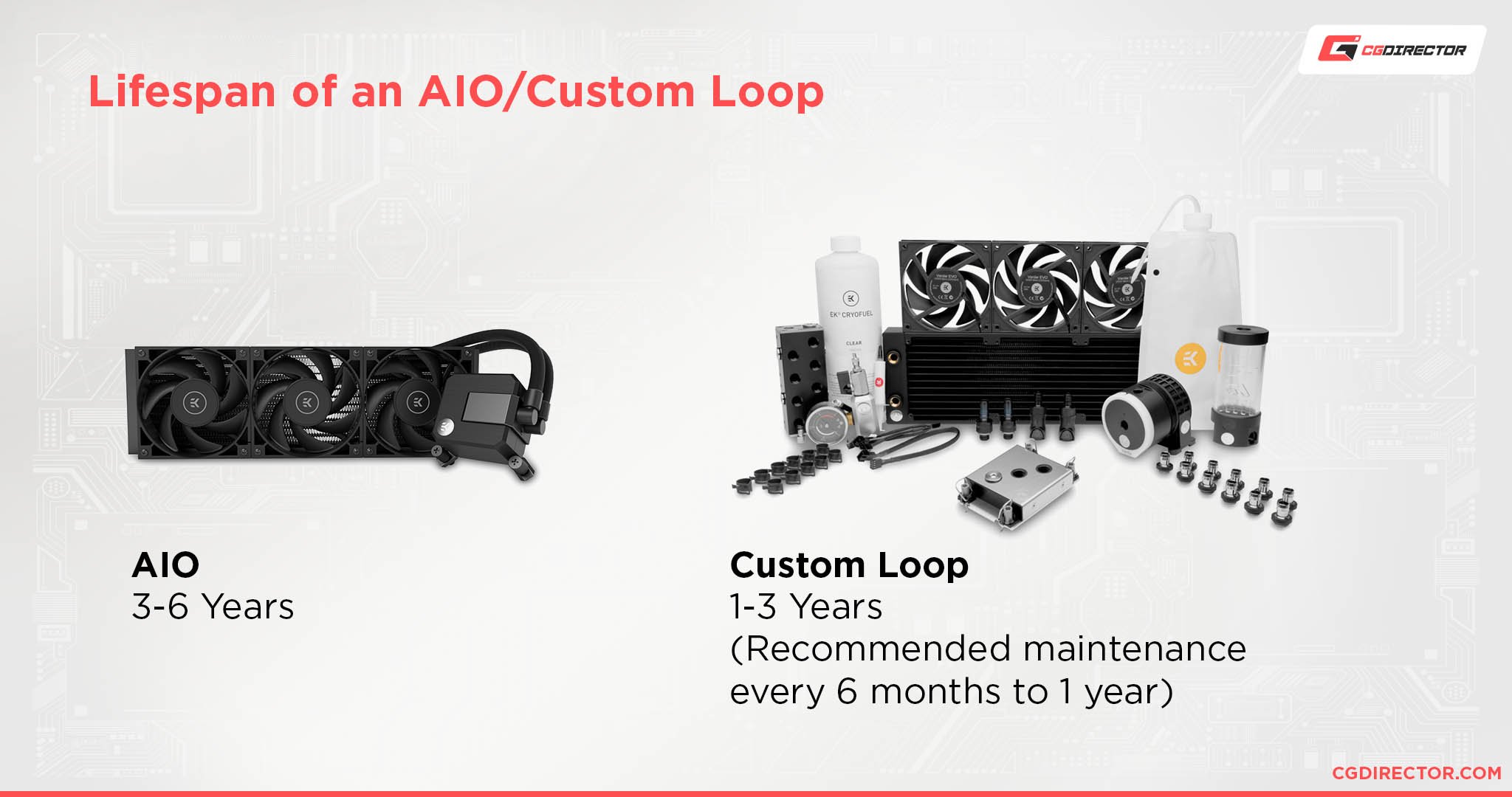
Most liquid coolers—both AIOs (All-in-One) and custom loops—will happily work for 3 to 5 years before things get dicey. That’s like the lifespan of a really good pair of jeans, but with more fans. If you’re lucky, some AIOs can stretch to 6 or 7 years—though your CPU might start sweating nervously around year four.
But here’s the catch: it depends on what kind of liquid cooler you have. It’s like asking “how long does a sandwich last?” Well, a PB&J in a fridge lasts a week; a tuna melt on your car dashboard? About 20 minutes. Let’s break it down.
Must Read
AIOs: The Set-It-and-Forget-It Buddy
AIOs are the lazy person’s dream—a sealed system you plug in and forget. These typically last 3 to 5 years. Why not forever? Blame permeation—a fancy word for coolant slowly evaporating through the rubber tubes, like a very slow, sad leak. The pump is also the weak link; it’s a tiny mechanical heart that can give out after constant use.
Signs your AIO is dying: you hear a gurgling sound (it’s not hungry, it’s failing), your CPU temps spike to “surface of the sun” levels, or the pump starts rattling like a maraca. If that happens, replace it immediately—don’t be a hero, your processor will thank you.
The Pump is the Hero (and the Villain)
Think of the pump as the one friend who organizes all the parties. When it stops, the party’s over. Most pump failures happen between year 3 and 5, but cheap units can die in year 1 (ouch). Brands like Corsair, NZXT, and Arctic tend to have pumps that last closer to 5-7 years if you treat them nicely.
Pro tip: mount your AIO correctly! Put the radiator higher than the pump (usually on the top of your case) so air bubbles don’t get trapped in the pump. Air in the pump is like sand in a smoothie—bad news. Follow that rule, and your cooler might just outlive your desire to upgrade your GPU (which is saying something).
 How Often To Replace Liquid Cooling Pc at Larry Childs blog
Custom Loops: The Fancy, High-Maintenance Sports Car
Custom loops are for enthusiasts who love tinkering—they look incredible, but they’re a long-term commitment. The pumps can last 5 to 10 years (they’re beefier than AIO pumps). But you can’t just set them and forget them. The coolant will get gross—think swamp water, but inside your PC.
You need to change the coolant every 12 to 18 months, or gunk builds up and clogs your water blocks. Algae can grow in custom loops if you use colored coolant without proper biocides. Yes, literal algae—your PC is now a tiny aquarium. Don’t laugh; I’ve seen it happen. It’s not cute.
And Then There’s Tubing
Soft tubing (rubber hoses) lasts 3 to 5 years before it gets brittle or cloudy. Hard tubing (acrylic or glass) can last forever—until you drop a screwdriver on it and it shatters into a thousand pieces of regret. But barring accidents, hard tubing is the immortal vampire of cooling setups.
The real risk? O-rings and seals. These rubber gaskets dry out after 4 to 6 years. A tiny dried-out O-ring can turn your custom loop into a sprinkler system for your PC. Not the kind of water feature you want at your desk, trust me.
What Actually Kills Liquid Coolers?
It’s rarely a single dramatic event. Usually, it’s a slow death: coolant evaporates, the pump grinds down, or dust turns your radiator into a fuzzy blanket. You can slow the aging process. Dust your PC every 3-4 months—radiators are dust magnets, and a dirty radiator makes the pump work harder.
 How To Replace Liquid CPU Cooler | Robots.net
Also, don’t move your PC while it’s on! Sloshing liquid can push air bubbles into the pump. That’s like shaking a soda can and then opening it—except instead of messy soda, you get a dead pump. So be gentle, champ.
Can You Make a Liquid Cooler Last Longer?
Absolutely! For AIOs: run your PC 24/7 at low fan speed (constant gentle use is better than hard start-stops). For custom loops: use distilled water with a biocide—that clear liquid is your friend. And always, always, check your temps once a month. A sudden 10°C spike means something is wrong—don’t ignore it like that weird noise your car makes.
If an AIO fails, just replace it—they’re not worth repairing. Custom loops are repairable, but expect to spend $50-$100 on new tubing, coolant, and seals every 2-3 years. It’s a hobby, not a one-time purchase.
The Uplifting Finale (You Made It!)
So, how long does a liquid cooler last? 3 to 7 years for an AIO, and 5 to 10+ for a custom loop, with regular love. But here’s the happy truth: you will probably upgrade your PC before your cooler dies. By year 4, you’ll be drooling over the next-gen CPU or a case that looks like a spaceship. Your cooler will be retired, not betrayed.
In the end, a liquid cooler is like a loyal pet—it’s here for a good time, not a long time. It keeps your CPU cool while you crush frames, and when it finally gives up, you thank it for the memories. So don’t stress. Mount it right, clean it occasionally, and let it roar. Your PC is going to be fine. And so are you. Now go build something awesome—and maybe name your cooler Bob. Bob the Cooler sounds like a champ.
